Run WhatsApp at scale without living in it

A Windows app that sends your campaigns, answers with AI, and routes conversations through flows you draw yourself — running on your own computer, on your own numbers.

One-time payment, no subscription. Windows 10 or 11. The installer needs a licence key to activate — you get one by email the moment you buy. 7-day money-back guarantee.

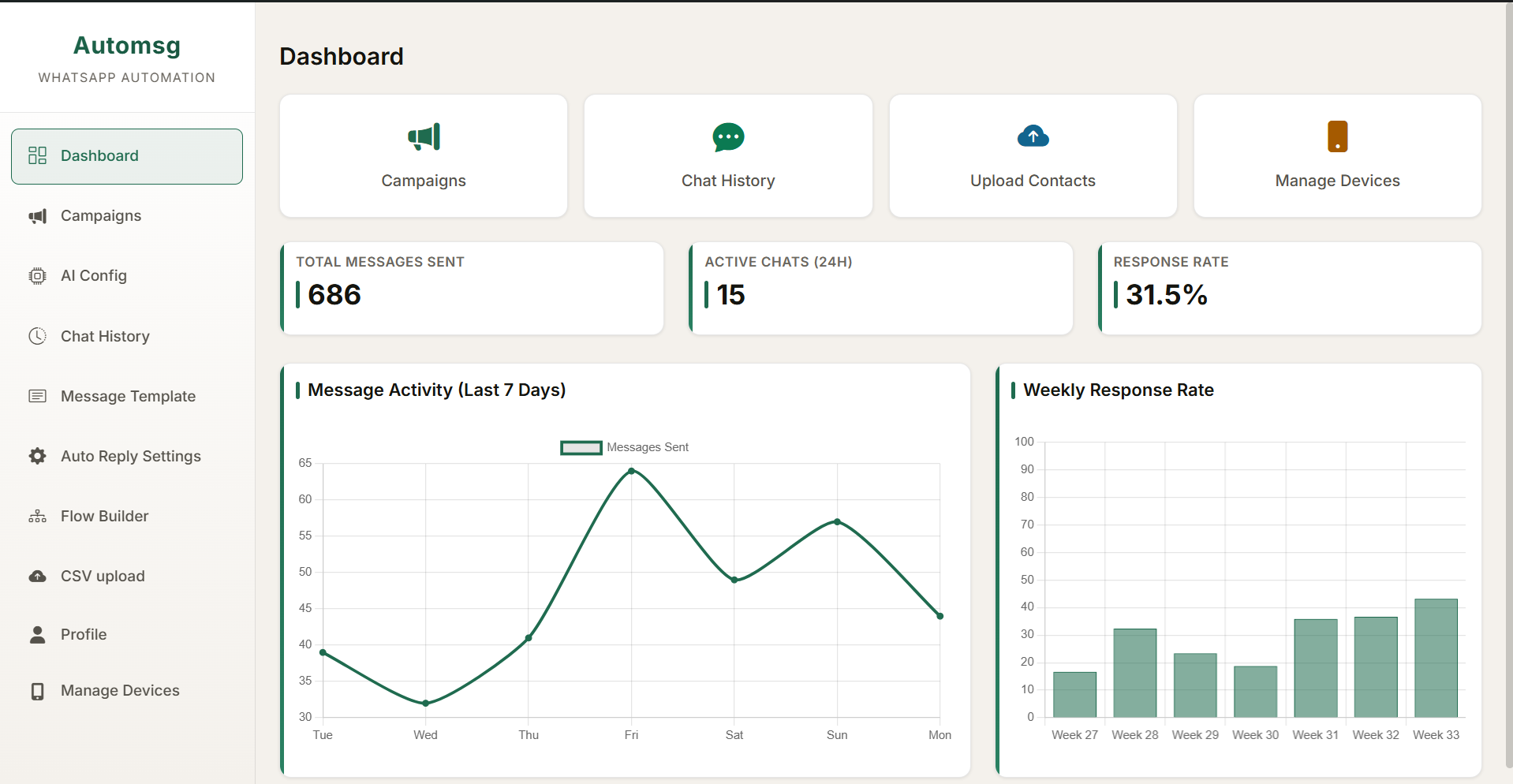
The AutoMsg dashboard: 686 total messages sent, 15 active chats in the last 24 hours and a 31.5 percent response rate, above a seven-day message activity graph and a weekly response rate chart
  • One-time payment, no renewals
  • Runs entirely on your own PC
  • Up to 4 WhatsApp numbers per licence
  • 7-day money-back guarantee

01 — Campaigns

Send to a list, not one thread at a time

Import the people you want to reach, write the message once with the fields that change per person, and let the app work through the list at a pace you set.

  • Import contacts from CSV, with every upload kept in history so you can see what went out and to whom
  • Reusable message templates with per-contact variables, so one campaign still reads as a personal message
  • Connect up to four numbers and choose which one a campaign sends from
02 — AI replies

Answer the easy questions while you sleep

Give the assistant your own context and let it handle the repeat questions — hours, pricing, availability — so you only pick up the conversations that actually need you.

  • Configure the assistant's instructions and tone per number, not one global setting for everything
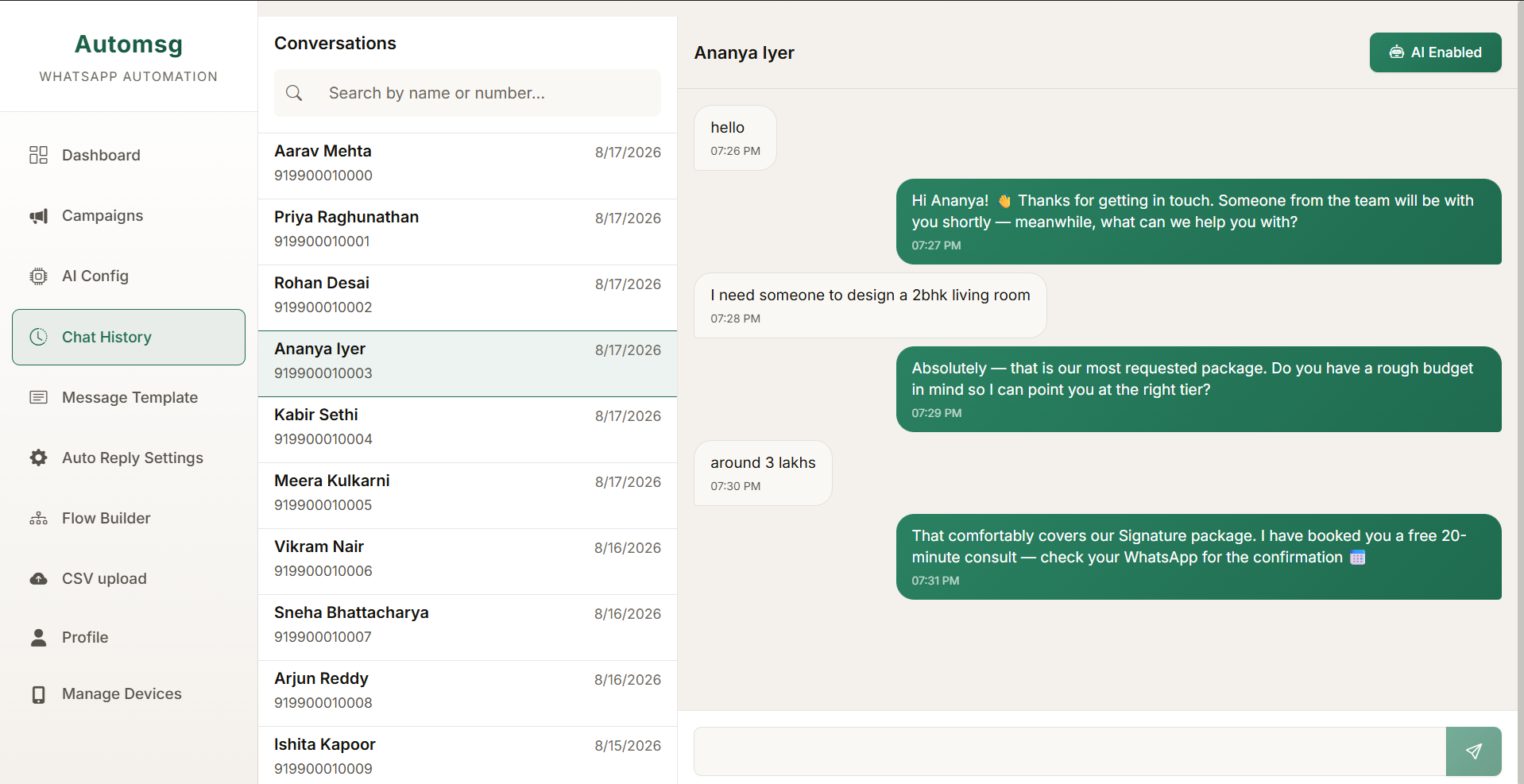
  • Full chat history kept in the app, so you can read what the AI said before you take over
  • Auto-reply rules you switch on and off per number without touching the AI configuration

03 — Flow builder

Draw the conversation, then let it run

Some conversations are a decision tree, not a chat. Lay the steps out on a canvas, connect the branches, and the same path runs every time without you watching it.

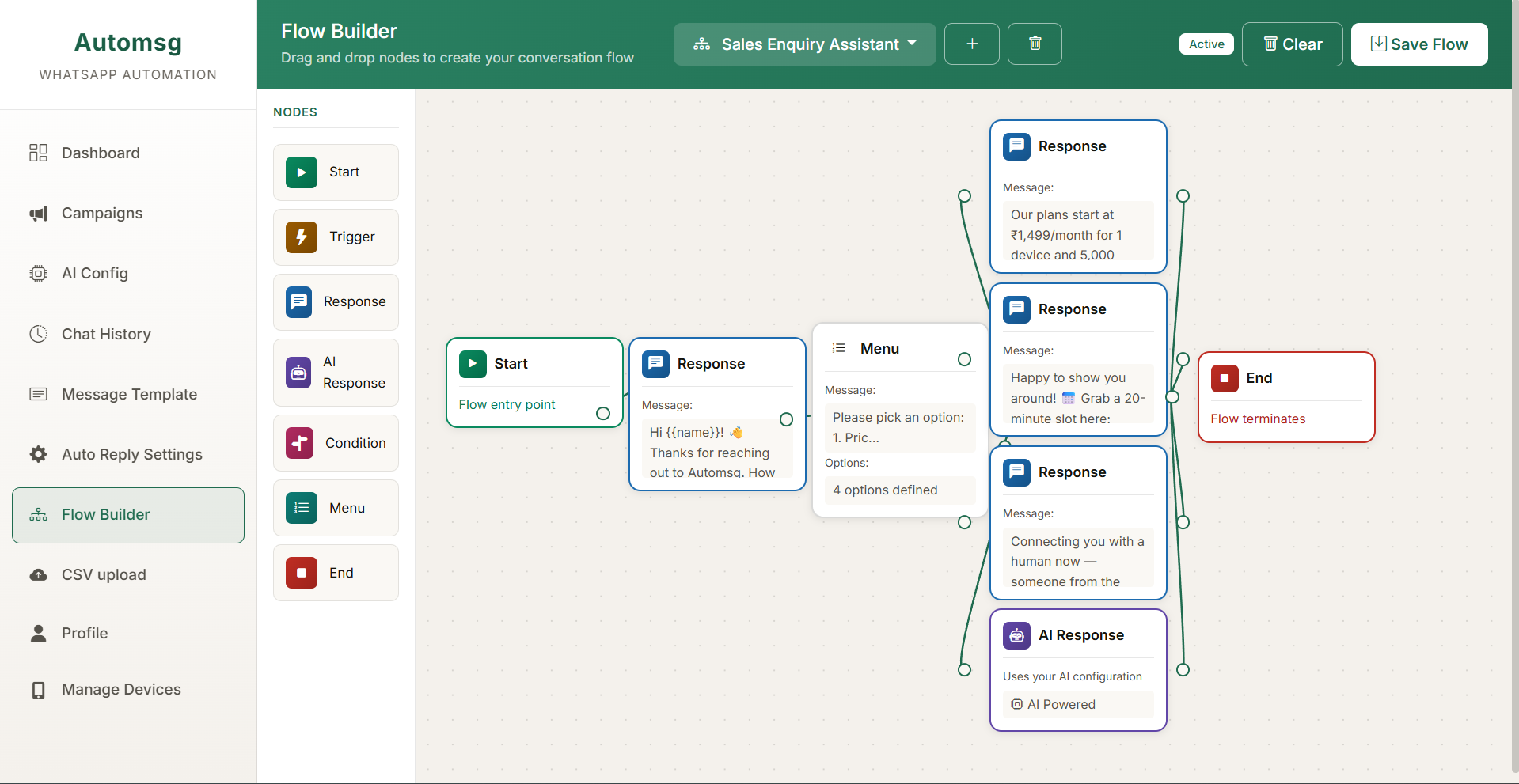
  • Visual canvas — drag steps, connect them, see the whole path at once
  • Branch on what the person replies, so different answers take different routes
  • Save flows and reuse them across numbers instead of rebuilding each time
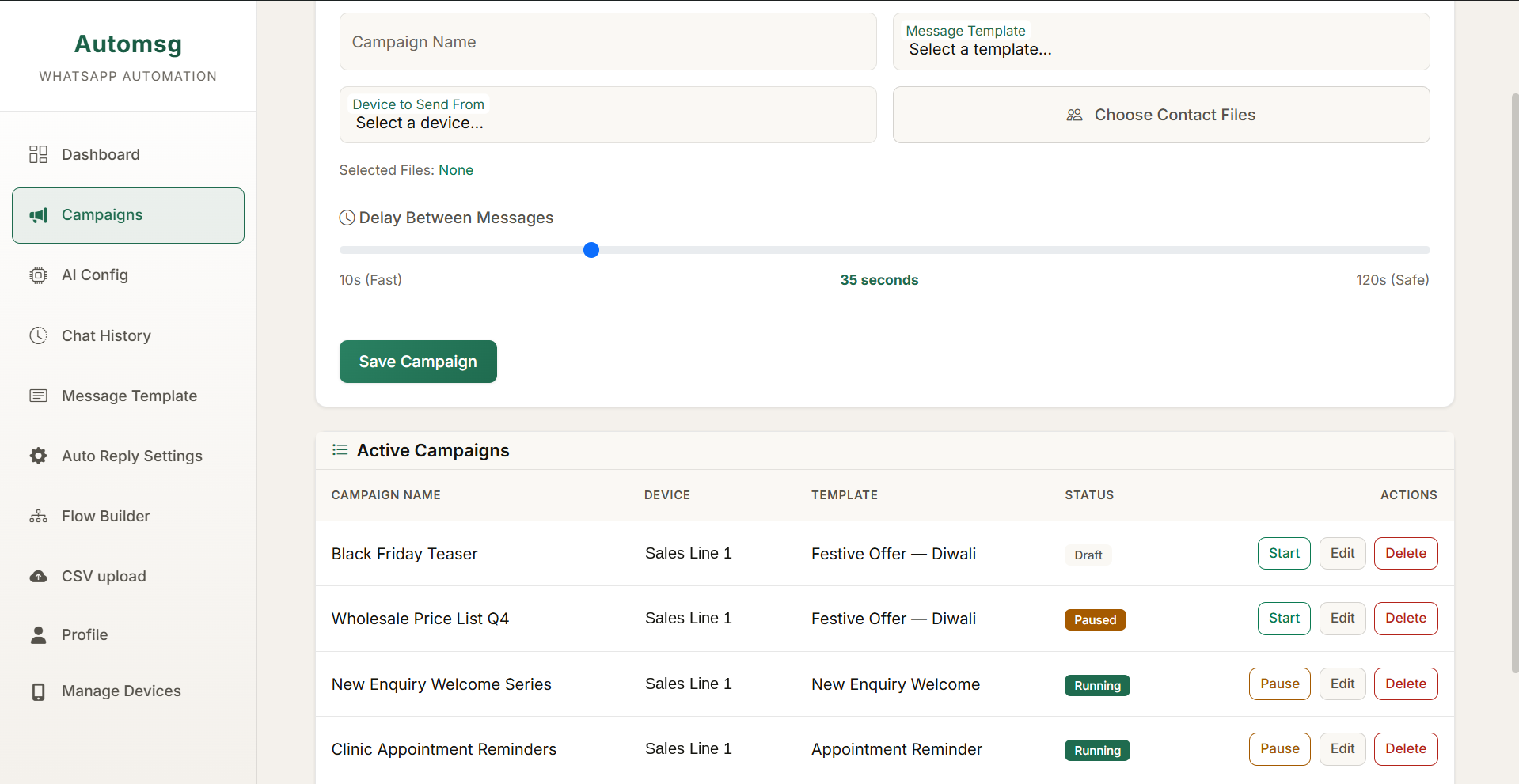
The campaign composer, with a delay-between-messages slider set to 35 seconds on a scale from 10 seconds fast to 120 seconds safe, above a table of active campaigns and their status
Campaign composer
The reply inbox: a conversation list on the left and an open thread where the AI has answered a customer's question about a room design package and offered to book a consultation
AI reply inbox
The flow builder canvas showing a sales enquiry assistant: a start node leading to a greeting, then a four-option menu branching into separate replies and an AI response node
Flow canvas

How it works

Three steps to your first campaign

Everything runs on your computer. There is no number to rent, no monthly quota, and nothing routed through a server we own.

  1. Step 01

    Install and activate

    Run the installer and paste the licence key from your purchase email. Activation is a one-time step — after that the app opens straight to your dashboard.

  2. Step 02

    Bring in your contacts

    Import a CSV of the people you are allowed to message, then pick or write the template that goes out to them.

  3. Step 03

    Send, then let it answer

    Start the campaign and leave the app running. Replies come back into your inbox, where your AI settings and flows take over.

Your number

Is this safe for my number?

What gets a number into trouble is behaving like a machine: identical messages, fired back to back, to people who never asked. The app is built to not do that — and to let you slow it down further whenever you want.

  • You set the pace

    Every campaign has a delay between messages that you choose, anywhere from 15 to 120 seconds. The default is 35 seconds, and nothing sends faster than one message every 10 seconds.

  • Gaps are randomised

    The wait between two messages is not a fixed number. It varies by up to five seconds either side of your setting, so the timing never falls into a perfect pattern.

  • Your machine, your number

    Sending happens from your own PC and your own connection. You are not sharing infrastructure with other senders, and your account is never handed to a third party.

A note on how you use it: none of the above helps if you message people who never gave you their number. Send to contacts who opted in, keep your lists current, and stop messaging anyone who asks you to. Unsolicited bulk messaging is the single most likely way to lose a number, whatever software you use.

Pricing

Pay once, keep it

No subscription, no per-message fee, no seat count. Buy the licence once and the app stays yours, including every future update.

Lifetime licence

 
  • Campaigns with CSV import and reusable templates
  • AI auto-replies with your own instructions
  • Visual conversation-flow builder
  • One PC, up to four WhatsApp numbers
  • All future updates, free for life
  • Email support

7-day money-back guarantee. Windows 10 or 11 — no Chrome or Node.js install needed.

One-time payment, billed in INR through Razorpay. Licensed for personal use.

Requirements

What you need to run it

Operating system Windows 10 or Windows 11, 64-bit.
Other software None. The browser engine the app needs is included in the installer — you do not have to install Chrome, Node.js or anything else.
Memory 4 GB RAM minimum, 8 GB recommended if you run large campaigns.
Disk space About 1.5 GB free.
Also needed A phone with the WhatsApp account you want to use, to connect it to the app the first time.

FAQ

Questions people ask first

Do I need to install Google Chrome?

No. The app ships with its own browser engine inside the installer, so it works on a clean Windows machine with nothing else installed. That is also why the download is large — everything it needs is in the one file.

Will this get my number blocked?

It can, if you use it carelessly. Any messaging platform will act against an account that behaves like a bulk sender, and no software can promise otherwise.

What the app does is give you control over the thing that matters most: pace. You choose a delay of 15 to 120 seconds between messages, it never goes below 10 seconds, and each gap is randomised by a few seconds so the rhythm is not mechanical. Beyond that it is down to who you message. Send only to people who gave you their number, and stop when someone asks you to.

What does the licence actually cover?

One licence activates the app on one PC and lets you connect up to four WhatsApp numbers to it. It is a personal-use licence, it never expires, and every future update is included at no extra cost. Email support is included too.

Can I get a refund?

Yes — there is a 7-day money-back guarantee. Email sales@automsg.me within 7 days of your purchase and you get your money back, no explanation required. Full details on the refund policy page.

Where is my data stored?

On your computer. Contacts, campaigns, message templates, flows and chat history all live in a database file on your own disk. None of it is uploaded to us, and the app's internal servers are reachable only from your own machine.

The app contacts us for three things and nothing else: activating your licence, a once-a-day check that the licence has not been revoked, and an anonymous error report if the messaging engine fails to start. The privacy page lists exactly what each of those sends.

Can I move it to a new computer?

Yes. A licence is tied to one machine at a time, so email sales@automsg.me from the address you bought with and we will release it from the old PC so you can activate on the new one.

Your data does not travel with the licence — it is on the old machine's disk, so move or re-import anything you want to keep before you wipe it.

Set it up once. Let it run.

Buy the lifetime licence and your key arrives by email straight away.

One-time payment. Windows 10 or 11. The installer needs a licence key to activate. 7-day money-back guarantee.